कैसे खेलें
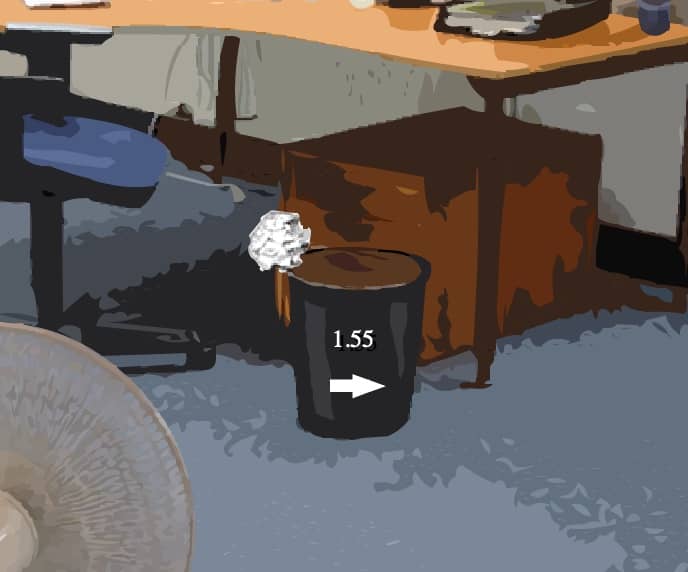
The core objective of Paper Toss is to successfully throw a crumpled paper ball into a trash can from a set distance. Each level presents a stationary trash can, and a fan of varying speed blows from right to left, creating wind resistance that affects the ball's trajectory. To play, you swipe or click and drag on the paper ball to set the angle and power of your throw, then release to launch it. The challenge is to judge the wind speed and adjust your aim accordingly. In the early stages, focus on getting a feel for the basic swipe mechanics and how the wind pushes the ball. As you progress, the fan speed increases, requiring more precise adjustments. A useful beginner strategy is to aim slightly to the right of the trash can to compensate for the wind pushing left. During tense moments, take a moment to watch the fan's animation to gauge the exact wind speed before making your throw. The game is played in a series of attempts, and the goal is to make as many consecutive shots as possible.
गेम की जानकारी
Paper Toss ऑनलाइन खेलें - FLASH गेम से जुड़े अक्सर पूछे जाने वाले सवाल
क्या Paper Toss मुफ़्त में ऑनलाइन खेला जा सकता है?
हाँ। बिना कुछ डाउनलोड किए, GGEMU पर अपने ब्राउज़र में Paper Toss मुफ़्त ऑनलाइन खेलें।
क्या Paper Toss मोबाइल पर खेला जा सकता है?
हाँ। GGEMU के ज़रिए Paper Toss को मोबाइल डिवाइस और डेस्कटॉप ब्राउज़र, दोनों पर खेला जा सकता है।
क्या Paper Toss में गेम की प्रगति सेव की जा सकती है?
Paper Toss अभी GGEMU सेव स्टेट्स को सपोर्ट नहीं करता। अगर गेम में अपनी सेव सुविधा है, तो उसकी जगह उसका इस्तेमाल किया जा सकता है।
क्या Paper Toss खेलने के लिए एमुलेटर या खास हार्डवेयर चाहिए?
नहीं। Paper Toss GGEMU पर सीधे ब्राउज़र में चलता है और इसके लिए किसी अतिरिक्त हार्डवेयर या सॉफ़्टवेयर की ज़रूरत नहीं है।
क्या Paper Toss को फ़ुलस्क्रीन मोड में खेला जा सकता है?
हाँ। अधिक शानदार अनुभव के लिए Paper Toss GGEMU पर फ़ुलस्क्रीन मोड को सपोर्ट करता है।
क्या Paper Toss को गेमपैड या कंट्रोलर से खेला जा सकता है?
हाँ। कोई संगत कंट्रोलर कनेक्ट होने पर GGEMU पर Paper Toss को गेमपैड से खेला जा सकता है।