遊び方
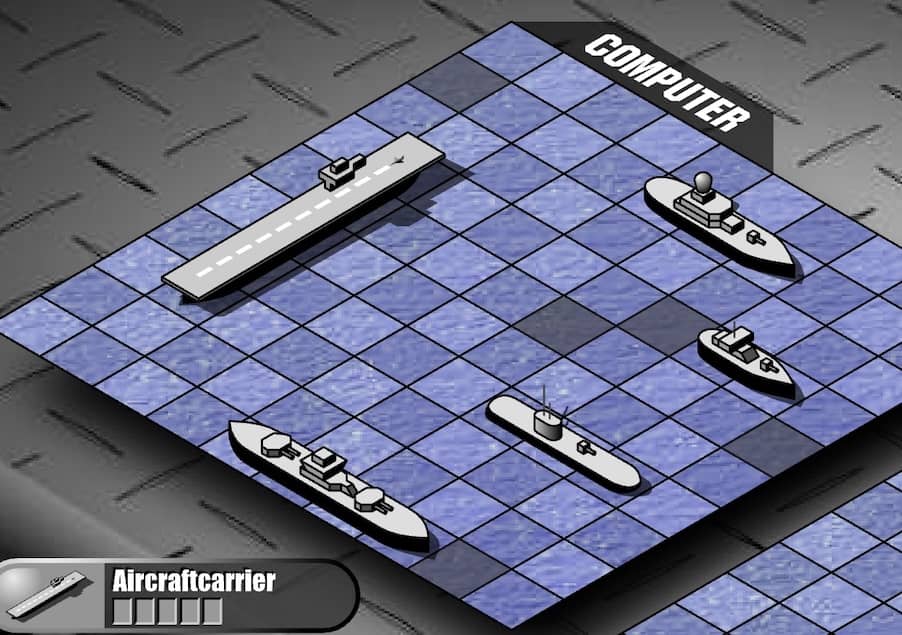
Battle Ships - General Quarters II is a turn-based strategy game where you command a fleet of ships on a grid. Your objective is to locate and destroy all of your opponent's ships before they destroy yours. On each turn, you select a coordinate on the grid to fire a shot. A hit is marked, and you continue firing until you miss, at which point the opponent takes their turn. Your ships are initially placed automatically or manually at the start, hidden from the enemy. The core gameplay loop involves deduction and probability, using the feedback from your hits and misses to narrow down the possible locations of the remaining enemy vessels. Early in the game, focus on firing shots in a spread-out pattern to efficiently scout the board. Once you score a hit, concentrate your subsequent shots in the adjacent horizontal and vertical cells to sink the entire ship. The challenge escalates as the number of ships dwindles and the grid becomes more sparse, requiring careful tracking of which ship sizes remain. In tense moments, prioritize targeting areas where larger ships could still fit. A key beginner strategy is to avoid predictable firing patterns that the AI might exploit.
ゲーム情報
Battle Ships - General Quarters IIをオンラインでプレイ – FLASH版のよくある質問
Battle Ships - General Quarters IIは無料でオンラインプレイできますか?
はい。ダウンロード不要で、GGEMUのブラウザ上からBattle Ships - General Quarters IIを無料でオンラインプレイできます。
Battle Ships - General Quarters IIはスマートフォンで遊べますか?
はい。GGEMUなら、スマートフォンなどのモバイル端末でもパソコンのブラウザでもBattle Ships - General Quarters IIをプレイできます。
Battle Ships - General Quarters IIの進行状況を保存できますか?
Battle Ships - General Quarters IIは現在GGEMUのセーブステートに対応していません。ゲーム内にセーブ機能がある場合は、そちらをご利用ください。
Battle Ships - General Quarters IIを遊ぶにはエミュレーターや専用ハードが必要ですか?
いいえ。Battle Ships - General Quarters IIはGGEMUのブラウザ上で直接動作するため、追加のハードウェアやソフトウェアは必要ありません。
Battle Ships - General Quarters IIはフルスクリーンで遊べますか?
はい。Battle Ships - General Quarters IIはGGEMUのフルスクリーンモードに対応しており、より没入感のあるプレイを楽しめます。
Battle Ships - General Quarters IIはゲームパッドやコントローラーで遊べますか?
はい。対応コントローラーを接続すれば、GGEMUでBattle Ships - General Quarters IIをゲームパッド操作できます。