How to play
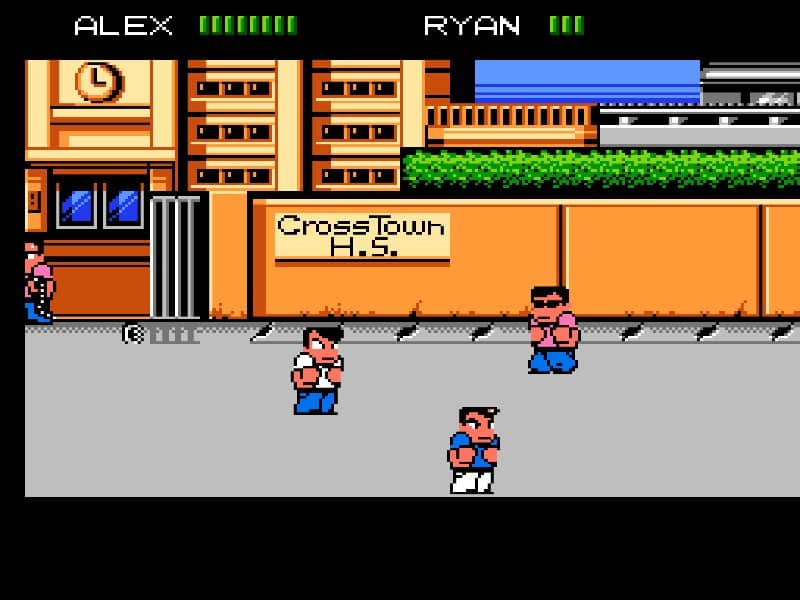
You control either Alex or Ryan, moving through urban environments from left to right. Your primary goal is to defeat waves of enemy gang members using punches, kicks, and special attacks. Defeated enemies drop money which you can use to purchase food and items from shops to permanently increase your character's stats like strength, agility, and health. The core gameplay loop involves clearing areas of enemies, managing your currency for upgrades, and occasionally battling sub-bosses before confronting the final gang leader. As a beginner, focus on learning the basic three-hit combo and the jumping knee drop attack, which is highly effective. In the early game, prioritize buying stat-boosting items like the Dragon Feet or Stone Hands to increase your damage output. During tense encounters, use hit-and-run tactics against stronger enemies and always keep health-restoring items like burgers or pizza handy for emergencies.
Information
Play River City Ransom Online - Famicom FAQ
Can I play River City Ransom online for free?
Yes. You can play River City Ransom online for free in your browser on GGEMU, with no download required.
Can I play River City Ransom on mobile?
Yes. You can play River City Ransom on mobile devices and desktop browsers through GGEMU.
Can I save my progress in River City Ransom?
Yes. River City Ransom supports local save states on GGEMU. Cloud saves are also available to GGEMU Premium members.
Do I need an emulator or special hardware to play River City Ransom?
No. GGEMU runs River City Ransom in your browser, so you do not need original Famicom hardware or a separate emulator.
Can I play River City Ransom in fullscreen mode?
Yes. River City Ransom supports fullscreen mode on GGEMU for a more immersive experience.
Can I play River City Ransom with a gamepad or controller?
Yes. River City Ransom supports gamepad controls on GGEMU when a compatible controller is connected.